Melissa Denby


Generate an AI action
This project builds on the previous one — Orion, the SRE, has created actions to help resolve incidents, but sometimes the incident is more complex and he needs more help. That's where AI comes in.
As the UX design lead, I created designs, collaborated with project management, the development team, and design across teams to create this flow that that allows AI to recommend and generate scripts for users. Because AI touches multiple areas of the product, I was responsible for ensuring the design fit into the broader strategy.

01
Gather information
The team was among the first at IBM Instana to use AI as part of the design workflow. Since there was a lot to consider, I took an AI Fundamentals for UX Designers course to better understand the challenges. Afterward, I joined an internal group of designers working in AI to keep learning.
02
Collaborate
I met with the entire team to whiteboard, and align us on scope — asking questions and discussing ideas. Balancing timelines, and feasibility, along with future ideas and user needs. Together we worked through user flows, concerns and benefits of introducing AI for our users.
• When to trust AI vs. using a standard action
• Where AI needs to be accessible within the product
• Who needs access to AI features (RBAC)
• Future considerations as part of the broader strategy


03
User scenarios
I created flows for two user scenarios — resolving an active incident, and creating a new action in the automation catalog using AI. One of our main priorities was to educate the user and provide transparency for the AI.
As part of implementation I also considered Instana's larger, cross-product transition to Carbon — a significant effort that affected design and development to ensure patterns were consistent for the user, updated, and the implementation was feasible for everyone involved.
Scenario 1: catalog
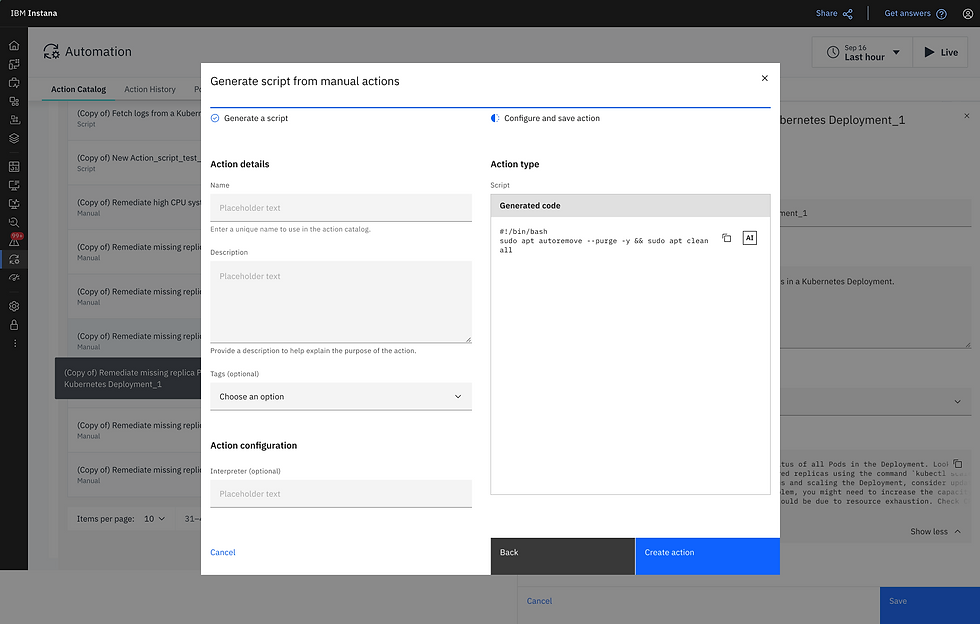
This flow starts on the Automation page that lists all of the actions in the catalog. The user can select an existing action or create a new one--at which point they must configure/edit it. They have the option to use AI to configure/edit it and once saved--this will update the action or add a new action to the catalog for the SRE to use.
Scroll through the flow or click the image if you'd like a larger view of the slides.


Scenario 2: incident
This flow starts during an incident. If the SRE cannot find a way to resolve the incident--they can use AI. This follows the same pattern as configuring a new action, and they're able to edit it, and add it to a policy which means next time this incident happens this action is available and may automatically run.
Scroll through the flow or click the image if you'd like a larger view of the slides.


04
Final designs
At this point our team of designers, project managers, developers, and design leadership have reviewed, doubled checked, tested, polished, and I've been maintaining communication and alignment so we deliver the designs to fidelity, in iterations, and on schedule...while considering future iterations.

Scenario 1: catalog
This is the same scenario as in the wireframes, starting from the Automation catalogue. However, this final version has been updated using the Carbon Design System and used for implementation.
Scroll through the flow or click the image if you'd like a larger view of the slides.


