Melissa Denby


Understanding incidents
This was a significant cross-team effort — helping users understand an incident, identify its root cause, and remediate it, all using new AI technology and a redesigned UI. It meant balancing the needs, schedules, and perspectives of team members across multiple overlapping teams.
Presented at IBM's THINK conference

01
Understanding impact
When the development team adopted an Agentic AI LLM model, the UI needed to be reworked. In short — the AI uses a large language model to analyze data, and the agent uses that data to determine the root cause of an incident.
The design challenge was about more than the interface. Users needed to understand and trust the results. That meant making AI transparent and genuinely helpful — not giving wrong answers, or answers users already knew. And because incidents impact the business in real time, speed matters.
Accessibility was also a key consideration, particularly for the interactive topology visualization — ensuring the experience worked for all users, including those with visual impairments.
02
UX basics and future
I started with a simple UX exercise — heuristically reviewing all the existing flows and grouping related items and actions together to bring some order to a complex experience.
From there, I worked with the content designer to add explainability, and with the visual designer to create an interactive topology so users could understand the cause of an incident and its root cause at a glance.
Finally, I coordinated closely with developers to implement the designs in the product with real-world examples — ensuring the design intent was preserved all the way through.


03
Overlapping team ideas
Around this time, the project grew in complexity. Three things were happening at once — connecting data between two teams to surface recommended actions for different root causes, incorporating AI more deeply through an assistant that could generate summaries and include new agents, and stepping back to rethink what an incident actually means and whether the broader strategy needed to evolve.
It was a lot to hold at once — and it meant staying closely aligned across multiple teams with different priorities and timelines.
04
Aligning...everyone
The central question was deceptively simple: "What is an incident?" The idea was floating — not gaining traction, but not being dismissed either.
After reviewing competitors and gathering internal feedback, I designed a workshop to bring the many teams together around a shared answer. A separate session with technical leaders worked through the details.


05
Final designs
The goal was to help the SRE understand the root cause of an incident and see what action to take to resolve it. The root cause of the incident may be different than the thing that triggered the incident to be created. To view all of the user flows please view the Figma files.
Scenario 1: root cause
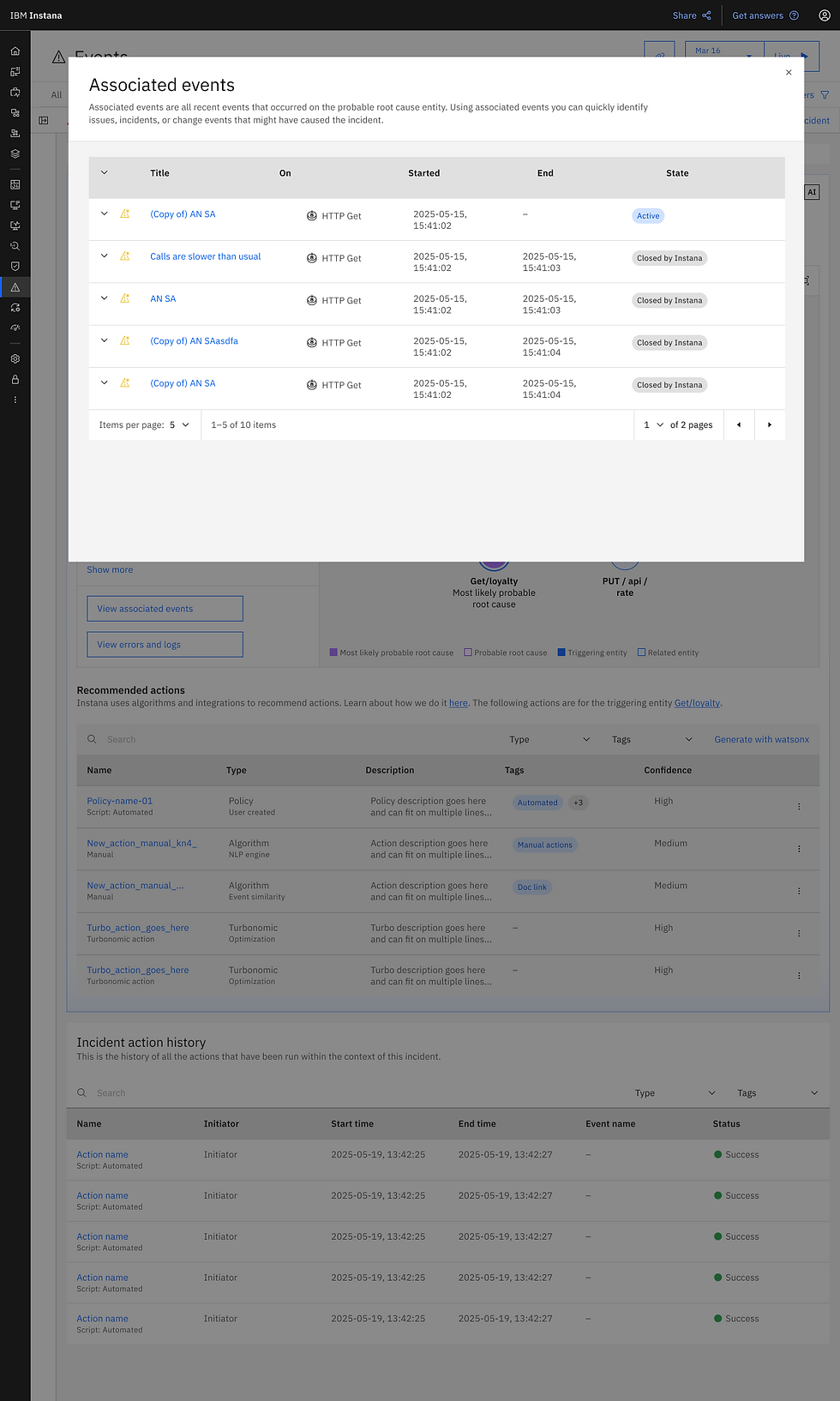
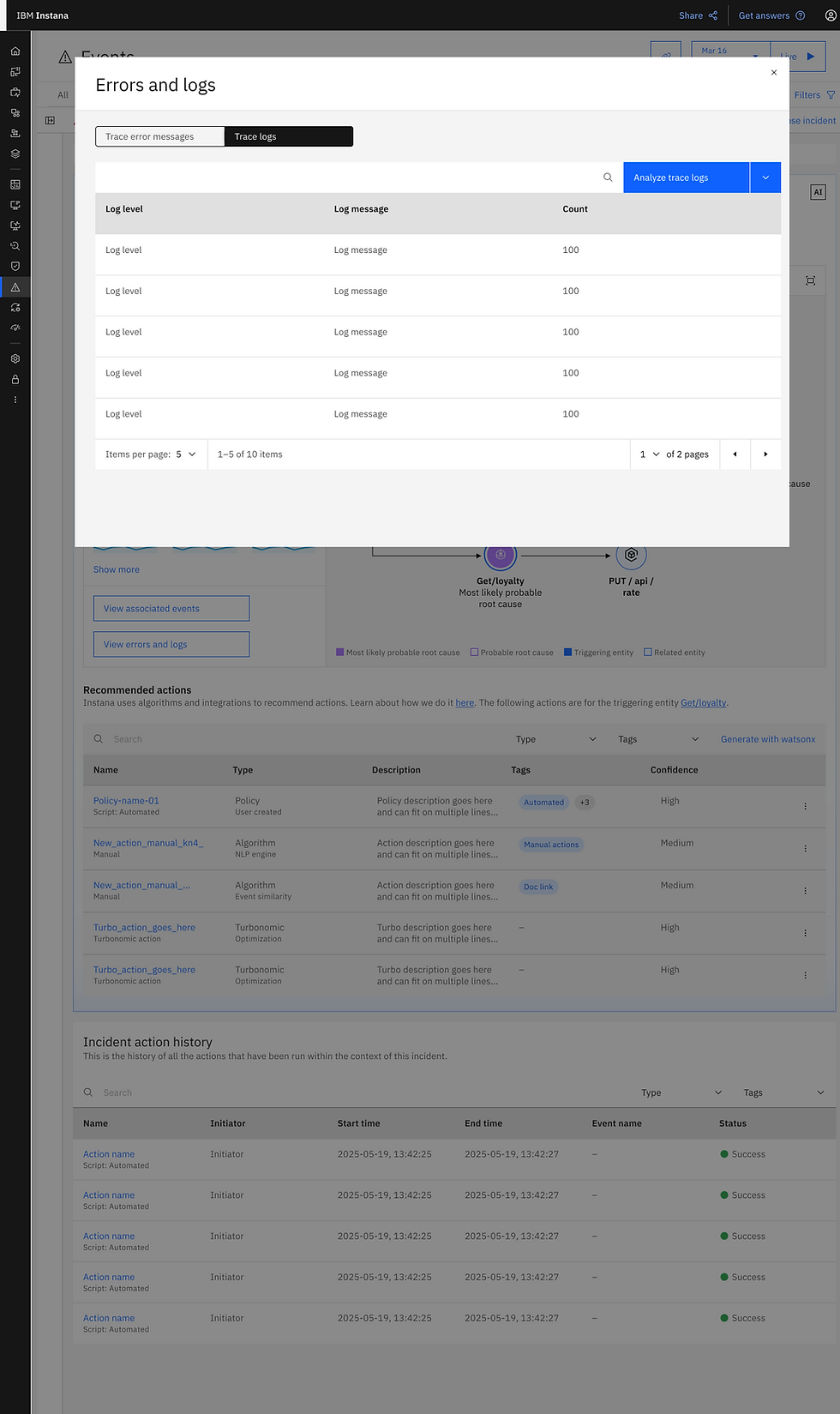
When an incident happens, this page shows the triggering event, and all of the probable root causes in a topology with details in the sidebar for which ever node is selected. By default the most likely probable root cause is selected in the topology. The sidebar shows details of the probable root cause along with buttons for more details — evidence on why Instana has thinks this is the most likely probable root cause.
Once the SREs feel comfortable in confirming the root cause, they can see the recommended actions to resolve it — these also change as different root causes are selected.
Scroll through the flow or click the image if you'd like a larger view of the slides.

Scenario 2: investigation
This flow shows an example of using AI to do a deeper dive into the root cause of the incident. The SRE clicks the "Run investigation" button. Why a button? Why not just automatically run the investigation? Well, that's a question that frequently came up and the simple answer is that it costs money or tokens to run. The incident might be simple, might be a known incident, or the probable root cause may be enough information for the SRE to resolve the incident.
Once the investigation is running, it may take a few minutes, so it was important to show running, and loading states so the user knows something is happening, or if they navigate away from the page, a notification appears on completion of the investigation.
Scroll through the flow or click the image if you'd like a larger view of the slides.


